 FlintyLemming
393 lines
14 KiB
Markdown
393 lines
14 KiB
Markdown
+++
|
||
author = "FlintyLemming"
|
||
title = "GLM-5.1 Coding 场景部署优化: HiCache 配置指南与场景压测"
|
||
slug = "256779ab64688063b3c9000c80fc01c6"
|
||
date = "2026-06-07"
|
||
description = ""
|
||
categories = ["AI"]
|
||
tags = ["SGLang", "GLM", "HiCache"]
|
||
image = "https://assets.mitsea.cn/blog/posts/2026/06/GLM-5.1%20Coding%20%E5%9C%BA%E6%99%AF%E9%83%A8%E7%BD%B2%E4%BC%98%E5%8C%96%EF%BC%9A%20HiCache%20%E9%85%8D%E7%BD%AE%E6%8C%87%E5%8D%97%E4%B8%8E%E5%9C%BA%E6%99%AF%E5%8E%8B%E6%B5%8B/jimmy-liu-k2zuVhKjA4o-unsplash.avif"
|
||
+++
|
||
|
||
## 背景
|
||
|
||
[SGLang HiCache](https://www.lmsys.org/blog/2025-09-10-sglang-hicache/) 在去年 9 月就已发布。它把 KV cache 分层到 GPU HBM 与主机内存(可选再下沉到磁盘),目标是在长上下文、多会话复用场景下,用更大的有效 cache 容量换更低的显存压力和更好的 cache 命中率。
|
||
|
||
但 [SGLang 官方 GLM-5.1 部署指南](https://docs.sglang.io/cookbook/autoregressive/GLM/GLM-5.1) 只写了默认的 EAGLE 投机解码(MTP)启动参数,**没有提到 HiCache 的开启方式**。如果你把 GLM-5.1 当 coding agent 后端用——多 repo 长上下文、持续 decode、周期性大 prefill——官方 compose 未必是最优选择。
|
||
|
||
本文记录我在 **8× NVIDIA H200、TP=8** 上部署 GLM-5.1-FP8 时启用 HiCache 的配置,以及与默认 MTP 方案的对比压测结果。文章由 AI 根据测试脚本和结果自动生成。
|
||
|
||
---
|
||
|
||
## HiCache 做了什么
|
||
|
||
简要概括 SGLang HiCache 的三层结构:
|
||
|
||
| 层级 | 介质 | 作用 |
|
||
|------|------|------|
|
||
| L1 | GPU HBM | 热 KV,低延迟 |
|
||
| L2 | Host DRAM | 溢出缓存,容量远大于显存 |
|
||
| L3 | 磁盘(可选) | 更大容量,适合冷数据 |
|
||
|
||
对 coding agent 这类 workload,典型收益路径是:
|
||
|
||
1. **多 repo / 多会话**:不同上下文的 KV 可以在 host 侧保留,减少重复 prefill。
|
||
2. **长上下文**:100k token 级别的 prompt 不可能全部常驻 GPU,HiCache 把冷 KV 换出到 host,需要时再 `load_back`。
|
||
3. **与 MTP 的取舍**:HiCache 和 EAGLE 投机解码争用显存与调度资源,实践中往往不能同时开满。
|
||
|
||
---
|
||
|
||
## 部署配置
|
||
|
||
### 硬件与镜像
|
||
|
||
- GPU:8× NVIDIA H200
|
||
- 镜像:`lmsysorg/sglang:latest`
|
||
- 模型:`/mnt/extend/models/llm/ZhipuAI/GLM-5.1-FP8`(FP8 量化)
|
||
- 并行:`--tp-size 8`
|
||
- 端口映射:`30001:8000`
|
||
|
||
### 官方默认配置(MTP,无 HiCache)
|
||
|
||
习惯使用 docker 部署以对齐官方环境使用的 CUDA 版本
|
||
|
||
文件:`compose.yaml`
|
||
|
||
```yaml
|
||
services:
|
||
sglang-glm-51:
|
||
image: lmsysorg/sglang:latest
|
||
restart: unless-stopped
|
||
container_name: sglang-glm-51-h200
|
||
init: true
|
||
stop_grace_period: 10m
|
||
runtime: nvidia
|
||
ports:
|
||
- "30001:8000"
|
||
volumes:
|
||
- /mnt/extend/models/llm/ZhipuAI/GLM-5.1-FP8:/models/GLM-5.1:ro
|
||
- ./default/cache/deep_gemm:/root/.cache/deep_gemm
|
||
- ./default/cache/triton:/root/.triton
|
||
- ./default/cache/flashinfer:/root/.cache/flashinfer
|
||
- ./default/cache/tvm-ffi:/root/.cache/tvm-ffi
|
||
- ./default/cache/sglang:/root/.cache/sglang
|
||
- ./default/cache/huggingface:/root/.cache/huggingface
|
||
environment:
|
||
- NVIDIA_VISIBLE_DEVICES=all
|
||
- SGLANG_ENABLE_SPEC_V2=1
|
||
ipc: host
|
||
shm_size: "128g"
|
||
deploy:
|
||
resources:
|
||
reservations:
|
||
devices:
|
||
- driver: nvidia
|
||
count: 8
|
||
capabilities: [gpu]
|
||
command:
|
||
- "python3"
|
||
- "-m"
|
||
- "sglang.launch_server"
|
||
- "--model-path"
|
||
- "/models/GLM-5.1"
|
||
- "--tp-size"
|
||
- "8"
|
||
- "--served-model-name"
|
||
- "glm-5.1"
|
||
- "--reasoning-parser"
|
||
- "glm45"
|
||
- "--tool-call-parser"
|
||
- "glm47"
|
||
- "--speculative-algorithm"
|
||
- "EAGLE"
|
||
- "--speculative-num-steps"
|
||
- "3"
|
||
- "--speculative-eagle-topk"
|
||
- "1"
|
||
- "--speculative-num-draft-tokens"
|
||
- "4"
|
||
- "--host"
|
||
- "0.0.0.0"
|
||
- "--port"
|
||
- "8000"
|
||
- "--enable-metrics"
|
||
```
|
||
|
||
特点:开启 **EAGLE 投机解码**(`SGLANG_ENABLE_SPEC_V2=1`),无分层 cache。
|
||
|
||
### HiCache compose
|
||
|
||
文件:`compose-hicache.yaml`
|
||
|
||
```yaml
|
||
services:
|
||
sglang-glm-51-hicache:
|
||
image: lmsysorg/sglang:latest
|
||
container_name: sglang-glm-51-hicache-h200
|
||
init: true
|
||
stop_grace_period: 10m
|
||
runtime: nvidia
|
||
ports:
|
||
- "30001:8000"
|
||
volumes:
|
||
- /mnt/extend/models/llm/ZhipuAI/GLM-5.1-FP8:/models/GLM-5.1:ro
|
||
- ./default/cache/deep_gemm:/root/.cache/deep_gemm
|
||
- ./default/cache/triton:/root/.triton
|
||
- ./default/cache/flashinfer:/root/.cache/flashinfer
|
||
- ./default/cache/tvm-ffi:/root/.cache/tvm-ffi
|
||
- ./default/cache/sglang:/root/.cache/sglang
|
||
- ./default/cache/huggingface:/root/.cache/huggingface
|
||
environment:
|
||
- NVIDIA_VISIBLE_DEVICES=all
|
||
ipc: host
|
||
shm_size: "128g"
|
||
deploy:
|
||
resources:
|
||
reservations:
|
||
devices:
|
||
- driver: nvidia
|
||
count: 8
|
||
capabilities: [gpu]
|
||
command:
|
||
- "python3"
|
||
- "-m"
|
||
- "sglang.launch_server"
|
||
- "--model-path"
|
||
- "/models/GLM-5.1"
|
||
- "--tp-size"
|
||
- "8"
|
||
- "--served-model-name"
|
||
- "glm-5.1"
|
||
- "--reasoning-parser"
|
||
- "glm45"
|
||
- "--tool-call-parser"
|
||
- "glm47"
|
||
- "--host"
|
||
- "0.0.0.0"
|
||
- "--port"
|
||
- "8000"
|
||
- "--mem-fraction-static"
|
||
- "0.85"
|
||
- "--enable-metrics"
|
||
- "--enable-hierarchical-cache"
|
||
- "--hicache-size"
|
||
- "200"
|
||
- "--hicache-io-backend"
|
||
- "direct"
|
||
- "--hicache-mem-layout"
|
||
- "page_first"
|
||
- "--hicache-write-policy"
|
||
- "write_through"
|
||
- "--watchdog-timeout"
|
||
- "1800"
|
||
```
|
||
|
||
### 关键差异对照
|
||
|
||
| 项目 | `compose.yaml`(MTP) | `compose-hicache.yaml`(HiCache) |
|
||
|------|----------------------|-----------------------------------|
|
||
| 投机解码 | EAGLE,3 steps,4 draft tokens | **关闭**(去掉全部 `--speculative-*`) |
|
||
| 环境变量 | `SGLANG_ENABLE_SPEC_V2=1` | 无 |
|
||
| 分层 cache | 无 | `--enable-hierarchical-cache` |
|
||
| Host cache 容量 | — | `--hicache-size 200`(GB) |
|
||
| IO 后端 | — | `direct` |
|
||
| 内存布局 | — | `page_first` |
|
||
| 写策略 | — | `write_through` |
|
||
| 静态显存占比 | 默认 | `--mem-fraction-static 0.85` |
|
||
| Watchdog | 默认 | `1800` 秒(长上下文 prefill 不易误杀) |
|
||
|
||
启动方式:
|
||
|
||
```bash
|
||
# HiCache 方案
|
||
docker compose -f compose-hicache.yaml up -d --remove-orphans
|
||
|
||
# 回退到 MTP 方案
|
||
docker compose -f compose.yaml up -d --remove-orphans
|
||
```
|
||
|
||
两套 compose 共用同一端口 `30001`,**不同时 up**。
|
||
|
||
---
|
||
|
||
## 压测脚本
|
||
|
||
纯 Python 标准库实现,不依赖额外压测框架。[测试脚本](https://gist.github.com/FlintyLemming/23602cd0b8584dee903a50722c42ea0d)
|
||
|
||
### 1. Mixed workload 基准:`coding_agent_mixed_benchmark.py`
|
||
|
||
模拟 coding agent 的真实混合负载:
|
||
|
||
- **4 个约 100k token 的 repo context**(合成代码仓库文本)
|
||
- **3 条持续 decode** worker,每条最多输出 2048 token
|
||
- 每 **30s** 注入 1 条 100k input / 64 output 的 prefill spike
|
||
- 每 **45s** 对已有 context 做 **revisit**(模拟切回旧 repo)
|
||
- 持续 **600s**,采集客户端流式指标与服务端 Prometheus metrics
|
||
|
||
内置两个 profile,通过 `--profiles` 切换:
|
||
|
||
| Profile key | Compose | 说明 |
|
||
|-------------|---------|------|
|
||
| `hicache` | `compose-hicache.yaml` | HiCache 开启,MTP 关闭 |
|
||
| `mtp` | `compose.yaml` | EAGLE MTP 开启,HiCache 关闭 |
|
||
|
||
示例命令:
|
||
|
||
```bash
|
||
cd /mnt/extend/models/llm/ZhipuAI/GLM-5.1-FP8/stress-test
|
||
|
||
# 只测 HiCache(脚本会自动 docker compose up/down)
|
||
python3 coding_agent_mixed_benchmark.py \
|
||
--profiles hicache \
|
||
--duration 600 \
|
||
--decode-workers 3 \
|
||
--repo-count 4
|
||
|
||
# 对比两组(先跑 hicache 再跑 mtp,自动切换 compose)
|
||
python3 coding_agent_mixed_benchmark.py \
|
||
--profiles hicache,mtp \
|
||
--duration 600
|
||
|
||
# 服务已手动启动时跳过 compose 管理
|
||
python3 coding_agent_mixed_benchmark.py \
|
||
--profiles hicache \
|
||
--reuse-running \
|
||
--keep-running
|
||
```
|
||
|
||
输出:`stress-test/reports/` 下的 `.md` 报告、`.json` 原始数据、`.svg` 图表。
|
||
|
||
### 2. 并发容量基准:`coding_agent_capacity_benchmark.py`
|
||
|
||
[测试脚本](https://gist.github.com/FlintyLemming/88f4ece905acbdb358cbdc4037b5f96e)
|
||
|
||
回答「能同时跑几个 coding agent」:
|
||
|
||
- **8 个约 100k token context**
|
||
- 并发档位:1 / 2 / 4 / 8 / 12(可自定义)
|
||
- 每档持续 **240s**,decode 输出上限 **1024 token**
|
||
- **mixed 模式**:每档内额外每 25s 注入 1 条 100k prefill 短输出请求
|
||
- 可用判定:失败率 ≤ 5%、单请求 output tok/s P50 ≥ 4、TTFT P95 ≤ 180s、max chunk gap P95 ≤ 8s
|
||
|
||
```bash
|
||
python3 coding_agent_capacity_benchmark.py \
|
||
--profiles hicache,mtp \
|
||
--modes mixed \
|
||
--concurrency-levels 1,2,4,8,12 \
|
||
--reuse-running
|
||
```
|
||
|
||
---
|
||
|
||
## 测试过程
|
||
|
||
测试日期:**2026-06-07**。
|
||
|
||
### 环境准备
|
||
|
||
1. 确认 8× H200 可见,`docker compose` 可用。
|
||
2. 模型权重挂载到 `/models/GLM-5.1`。
|
||
3. 启动目标 profile 的 compose,等待 `/v1/models` 可访问(脚本默认最多等 1800s)。
|
||
4. 可选:配合 Grafana 观察 `sglang_gen_throughput`、`sglang_num_queue_reqs` 等指标(脚本也会直接拉 `/metrics`)。
|
||
|
||
### 测试一:10 分钟 mixed workload
|
||
|
||
对 HiCache 与 MTP 各跑一轮 600s mixed 测试,口径:
|
||
|
||
- **客户端 output tok/s** = `completion_tokens / 实际完成 wall time`
|
||
- **Grafana 同口径** = Prometheus `sglang_gen_throughput` 采样均值
|
||
- **max chunk gap** = 流式输出中相邻 token chunk 的最大间隔(反映「卡住」体感)
|
||
- **HiCache 专属** = `cached_host`、`evicted`、`load_back` counter 增量
|
||
|
||
### 测试二:mixed 多并发容量
|
||
|
||
在 mixed 背景下扫描 1→12 并发,找出满足可用阈值的最大并发档位。
|
||
|
||
---
|
||
|
||
## 测试结果
|
||
|
||
### Mixed 10 分钟:核心指标
|
||
|
||
| Profile | Client output tok/s | Grafana avg tok/s | Queue avg/P95 | TTFT P50/P95 | Max chunk gap P50/P95 |
|
||
|---------|--------------------:|------------------:|--------------:|-------------:|----------------------:|
|
||
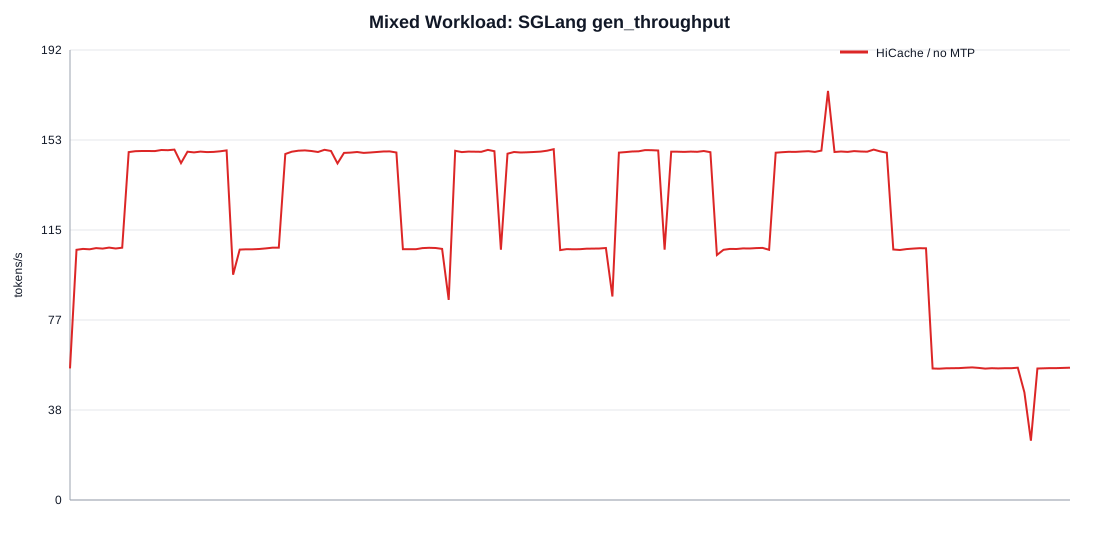
| **HiCache / no MTP** | 119.28 | 118.89 | 1.94 / 4.00 | 23.51 / 41.38 | **0.36 / 0.61** |
|
||
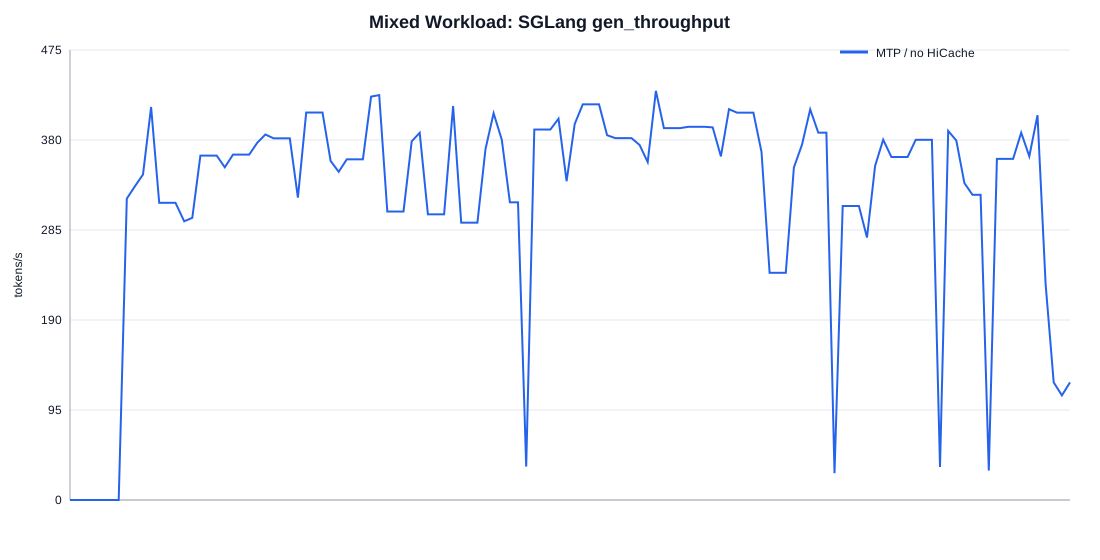
| MTP / no HiCache | 168.96 | 319.17 | 0.49 / 2.00 | 9.09 / 31.78 | 11.95 / **12.84** |
|
||
|
||
### HiCache cache 活动(10 分钟测试)
|
||
|
||
| 指标 | HiCache | MTP |
|
||
|------|--------:|----:|
|
||
| cached device | 3,456,640 | 4,812,160 |
|
||
| cached host | **2,900,096** | 0 |
|
||
| evicted | 23,949,824 | 17,915,904 |
|
||
| load_back | **23,200,768** | 0 |
|
||
| host used after | 885,888 | 0 |
|
||
|
||
HiCache 路径确实在工作:约 290 万 token 落在 host cache,约 2320 万 token 发生 load_back。
|
||
|
||
### 流式体验对比
|
||
|
||
**HiCache** — 输出平稳,几乎无 ≥1s 的 chunk 间隔:
|
||
|
||
|
||
|
||
**MTP** — 平均吞吐更高,但 decode/revisit 请求 **100% 出现 ≥1s 的 chunk gap**,P95 达 12.84s,即「写着写着突然停十几秒」:
|
||
|
||
|
||
|
||
### Mixed 多并发容量
|
||
|
||
| Profile | 最大可用并发 | 可用档最佳 output tok/s | 峰值 output tok/s(超阈值) |
|
||
|---------|------------:|------------------------:|----------------------------:|
|
||
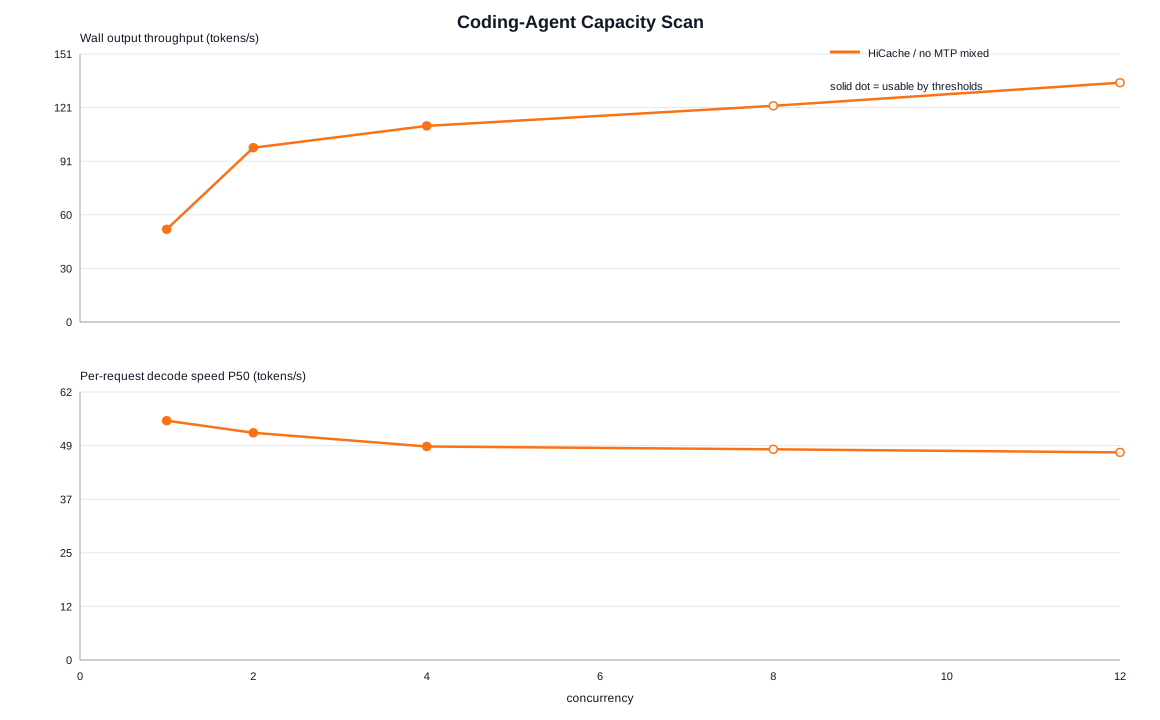
| **HiCache / no MTP** | **4** | **110.39** @ 并发 4 | 134.70 @ 并发 12 |
|
||
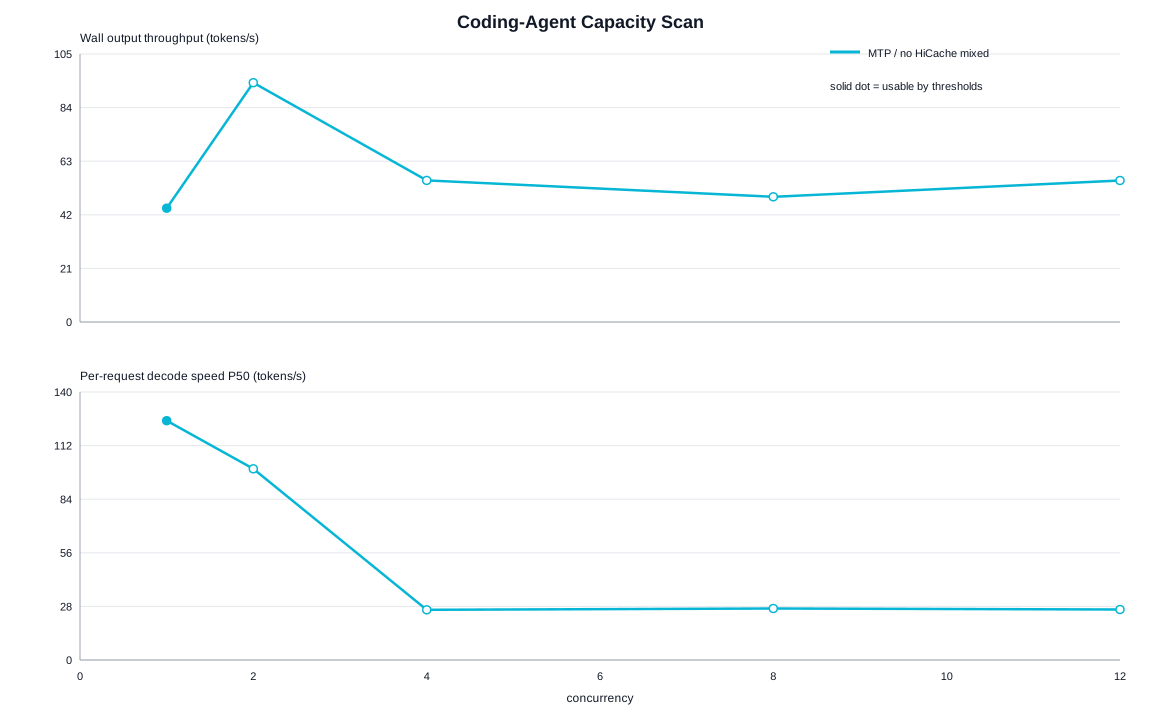
| MTP / no HiCache | 1 | 44.80 @ 并发 1 | 94.18 @ 并发 2 |
|
||
|
||
HiCache 在 mixed 场景下可稳定支撑 **4 路并发** coding agent;MTP 在并发 2 就已因 chunk gap 超标被判不可用。
|
||
|
||
|
||
|
||
|
||
|
||
分档细节(mixed 模式):
|
||
|
||
| 并发 | HiCache 可用 | HiCache tok/s | HiCache max gap P95 | MTP 可用 | MTP tok/s | MTP max gap P95 |
|
||
|-----:|:------------|-------------:|--------------------:|:--------|----------:|----------------:|
|
||
| 1 | yes | 52.18 | 0.61s | yes | 44.80 | 0.29s |
|
||
| 2 | yes | 98.12 | 0.65s | **no** | 94.18 | 13.61s |
|
||
| 4 | yes | 110.39 | 7.72s | no | 55.72 | 26.22s |
|
||
| 8 | no | 121.73 | 30.82s | no | 49.28 | 13.54s |
|
||
| 12 | no | 134.70 | 52.70s | no | 55.70 | 14.36s |
|
||
|
||
---
|
||
|
||
## 分析与结论
|
||
|
||
### HiCache 带来了什么提升
|
||
|
||
在 **coding agent 混合负载**下,HiCache 的优势不在「总吞吐数字」,而在 **体验与容量**:
|
||
|
||
1. **流式输出稳定**:max chunk gap P95 从 12.84s 降到 0.61s,消除了 MTP 下频繁的输出停顿。
|
||
2. **更高可用并发**:mixed 场景下可用并发从 1 提升到 4,更适合多 agent / 多 tab 同时编码。
|
||
3. **host 侧 KV 复用生效**:cached host 与 load_back 数据证明分层 cache 在 100k 上下文场景下持续运转。
|
||
|
||
### 需要接受的代价
|
||
|
||
1. **平均吞吐更低**:Grafana 同口径约 119 vs 319 tok/s。MTP 的投机解码在低干扰时确实更快,但 mixed workload 下高吞吐伴随着严重的 decode 饥饿。
|
||
2. **队列与尾部延迟**:HiCache 测试 600s 内请求尾部完成到 782.8s,队列 P95 更高;evict/load_back 有 CPU/PCIe 开销。
|
||
3. **与 MTP 互斥**:当前配置下二者不能兼得,需按场景选型。
|
||
|
||
### 选型建议
|
||
|
||
| 场景 | 推荐 |
|
||
|------|------|
|
||
| 交互式 coding agent、多 repo 切换、在意输出是否卡顿 | **HiCache**(`compose-hicache.yaml`) |
|
||
| 离线批量生成、单请求、追求峰值 tok/s | MTP(`compose.yaml`) |
|
||
| 生产监控 | 同时看 `sglang_gen_throughput`、TTFT、queue、客户端 chunk gap,不要只看平均吞吐 |
|
||
|
||
### 后续可尝试
|
||
|
||
- 调大 `--hicache-size` 或接入 L3 磁盘层,观察 evict/load_back 比例变化。
|
||
- 探索 PD disaggregation,把 prefill 与 decode 拆池,进一步缓解互相干扰。
|
||
- 关注 SGLang 新版本是否支持 HiCache + MTP 共存。
|